simple is beautiful
Digital Traveler: self portrait
2 ... 2 ...
Showing posts with label self portrait. Show all posts

Saturday, 8 December 2007

More About Self-Portraits


A couple of posts ago, I wrote directions for taking a self-portrait.

I didn't include the most obvious way to take a self portrait and that is taking a picture of yourself standing in front of a mirror or in front of some sort of reflective glass.

I didn't post my own self-portrait, either, because I couldn't locate the one I wanted to post.

But, alas, I found it and it's posted above.

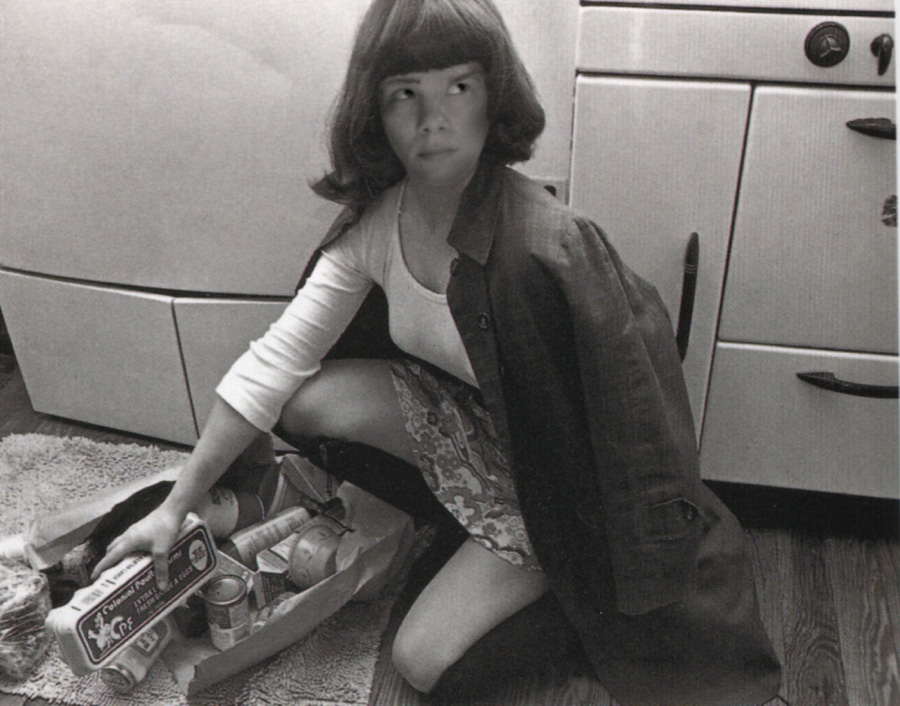
Speaking of self-portraits there are two photographers that come to mind: Cindy Sherman and Robert Mapplethorpe.

In the 1980s Sherman took pictures of herself in a variety of situations, sometimes acting out scenarios where she appears puzzled or bewildered.

Also in the 1980s Robert Maplethorpe took portraits of himself in a variety of roles, some of them sexual and controversial.

Wednesday, 5 December 2007

Digital Photography: How to Take Portraits and Self-Portraits


Candid portrait I took in Mexico

Everyone who’s anyone’s done it-made self-portraits or had had them shot or painted.

Pablo Picasso, Andy Warhol, Henri Matisse, Dali, and Max Ernst all did.

It’s a simple process, really that documents your existence, and even more, it reveals your character, who you are at any given moment. It represents the likeness of a person that can be caught on canvas or in a photograph or sketched on paper, any of which can be scanned and made into digital art.

In 1932 Gilberte Brassai photographed Pablo Picasso and in 1944 Henri Cartier-Bresson photographed Arnold Newman. Portraits entertain though the expressions of the subject. Some portrait artists collect images of the same person over a lifetime, some, like Cindy Sherman, photograph themselves.

As an artist you can choose who you want to create as your subject from the over-50 women of America’s Red Hat Society to young RAP singers or collect those of everyday people.

All you have to do is put your camera in auto or portrait mode and step back a bit from your subject, then zoom in to 80 mm focal length stepping back or forth until the image is clear when you press the shutter half-way down.

You can take your own self-portrait too--

1. Find a place to sit that's relatively clutter free both in front and in back. If you have to move a chair to the place go for it.
2. Check the lighting keep away from places where everything is casting a shadow.
3. Set your camera to portrait mode, look at the view finder and place the camera (use a tripod if you have to or a chair) so that it's pointing in the area where you will sit when it takes your picture.
4. Set the timer to the longest time there is. The timer shows up on your LCD screen as a clock (without a line crossed through it).
5. Place the camera where you want it (should be far enough so you have to zoom to 80mm to get the portrait) and click on the shutter.
6. Quickly move to the place that you found where you will pose for a picture.
7. After the camera takes the picture look at the LCD screen to see if your head and shoulders are comfortably in the frame. If not zoom in or out to where you think you will be in the frame.
8. Set the timer again and click the shutter.
9. Check to see if you're framed well.
10. Repeat steps 6 to 9, this time practicing a pose, say leaning forward in with your arms resting on your knee (a writer's pose).

Friday, 30 March 2007

Book Signing and Photography Seminar/Workshop at Borders and Self Portraits


Me, just in case you're from the media, here's a picture of me taken about two weeks ago. I've emailed many television stations and newspapers to let them know about the signings of "Digital Art Photography for Dummies" in:

1. Ft Myers Borders at 2 p.m. on Sunday, April Fools Day (April 1) no joke!
2. Ft. Lauderdale Borders at 2 p.m. on Saturday, April 7.


Other than that, every photographer or artist should experiment with self portraits.

Here's how you do it:

1. Find a place to sit that's relatively clutter free both in front and in back. If you have to move a chair to the place go for it.
2. Check the lighting keep away from places where everything is casting a shadow.
3. Set your camera to portrait mode, look at the view finder and place the camera (use a tripod if you have to or a chair) so that it's pointing in the area where you will sit when it takes your picture.
4. Set the timer to the longest time there is. The timer shows up on your LCD screen as a clock (without a line crossed through it).
5. Place the camera where you want it and click on the shutter.
6. Quickly move to the place that you found where you will pose for a picture.
7. After the camera takes the picture look at the LCD screen to see if your head and shoulders are comfortably in the frame. If not zoom in or out to where you think you will be in the frame.
8. Set the timer again and click the shutter.
9. Check to see if you're framed well.
10. Repeat steps 6 to 9, this time practicing a pose, say leaning forward in with your arms resting on your knee (a writer's pose).

LABEL